



Staff Augmentation Vs Managed Services: Choosing The Right IT Support Model




Table of Contents
Admins wait on password resets while finance can’t reach the invoice system. Managers need approvals routed before payroll closes. Field staff need mobile access before the first job starts, and internal IT gets pulled away from planned projects to clear tickets.
That’s why the choice between staff augmentation vs managed services is operational, not theoretical. When workload spikes, cloud migrations, security requirements, and helpdesk queues all compete for attention, managed services vs staff augmentation comes down to fit, risk, workload, and accountability. Cybersecurity is often part of the decision, with 60% of respondents saying it was the top challenge that led them to work with a managed services provider, or MSP.
Dan Wedin, Senior Sales Consultant at 24×7 I.T. Solutions, notes: “The right support model should remove bottlenecks from real workflows, not just add names to an org chart or tools to a dashboard.”
Staff Augmentation Vs Managed Services In Daily Operations
The right model depends on where pressure shows up first: tickets, projects, security, vendors, or infrastructure ownership.
A delayed printer ticket, a stuck Microsoft 365 login, and an overdue firewall update require different kinds of responsibility. We recommend what we’d do in our own business, whether that means outsourced IT, co-managed support, or staff augmentation during a workload spike. Even with newer tools, 87% of executives surveyed believe generative AI is more likely to augment employees than replace them.
-
Added technical capacity: Skilled people join an existing team for short-term or long-term needs.
-
Ongoing IT ownership: Systems, support, monitoring, security, backups, and vendors move to a partner.
-
Co-managed IT support: Internal staff keep control while outside engineers cover gaps, escalations, or specialized work.
-
Fully outsourced IT: One accountable partner handles the environment when there’s no internal team or leadership wants IT owned end to end.
Managed Services And Staff Augmentation During Workload Spikes
Workload spikes expose whether the business needs more hands, better ownership, or both. When ticket volume jumps, users need email restored, phones working, permissions fixed, and someone patient enough to explain what changed.
Specific domain scenario: During a busy roofing season, office staff need fast help with email, phones, job management software access, printer issues, and mobile devices used by field crews. A roofing client has described our team as knowledgeable, quick to respond, and patient. Our commitment is a qualified engineer working on the issue within 7 minutes or less, not a promise that every issue is resolved in that window.
From there, evaluate who owns each responsibility. Helpdesk coverage, cloud support, vendor coordination, and backup verification all affect how well the team absorbs the next spike.
Security capacity can become part of the same pressure. IBM reported severe security staffing shortages rose by 26%, and organizations with those shortages saw an average of $1.76 million in higher breach costs than organizations with low or no security staffing issues; another finding put average breach costs at $5.74 million for high-level shortages versus $3.98 million for low or none.
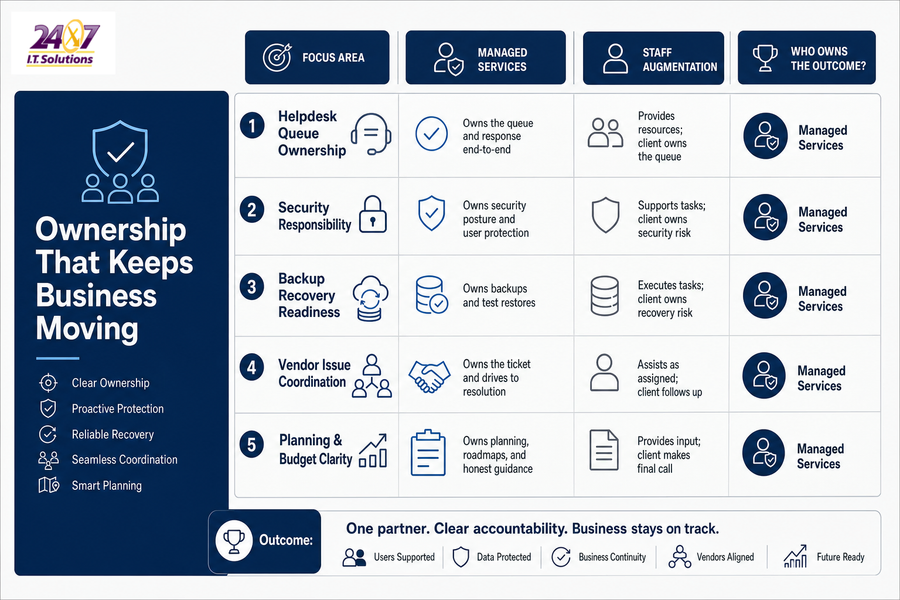
Managed Services Vs Staff Augmentation For Ownership And Accountability
The biggest difference isn’t only cost or staffing structure. It’s who owns outcomes when systems slow down, security tools need tuning, or a vendor points fingers.
-
Helpdesk queue ownership
Users need clear response expectations when a laptop won’t connect to Wi-Fi before a client meeting. We don’t leave people stuck between a ticket number and a vague update.
-
Security responsibility in plain English
Multi-factor authentication (MFA), endpoint protection, credential risk, and user training should be explained in terms of access, downtime, and data exposure.
-
Backup recovery readiness
We manually check backups every weekday starting at 7:00 a.m. and perform regular test restores, because business continuity depends on recoverable data, not just green checkmarks.
-
Vendor issue coordination
Internet providers, phone companies, and software vendors often overlap when service breaks. One partner should keep the ticket moving instead of sending your office manager in circles.
-
Planning and budget clarity
Roadmaps, cloud decisions, refresh timelines, and risky requests need honest review, including when the right answer is no.
Explore IT Support Models
-
Managed Services Vs Professional Services: Pick The Right IT Lane
-
Break Fix Vs Managed Services: Choosing IT Support That Keeps Work Moving
-
Why Managed Services Matter When IT Interruptions Slow Growth
-
Benefits Of Managed IT Services: Fewer Delays, Clearer Ownership, Stronger Support
-
IT Managed Services Challenges That Slow Approvals, Invoices, And Customer Work
Staff Augmentation Or Managed Services For Cloud And AWS Work
Your in-house team may be capable but stretched during a cloud migration, AWS cleanup, server refresh, or application move. Extra engineering capacity helps when deadlines are tight, while managed cloud services fit better when the work needs ongoing monitoring, patching, access management, cost review, and performance support.
We offer Managed Cloud Services and AWS services, including migration, management, infrastructure support, and ongoing technical support. We also help compare private cloud, AWS, hybrid, and refreshed on-premises options based on cost, reliability, security, and support needs. We’ve operated our own private cloud since 2007, so those conversations are grounded in systems we’ve designed, monitored, secured, and supported-not just a preference for moving everything to cloud.
Security planning matters during cloud work, too. According to IBM, organizations experiencing a high-level shortage of security skills faced an average breach cost of USD 5.74 million, compared with USD 3.98 million for those with lower-level shortages.
-
Migration support: Move file shares, applications, or servers without pulling internal staff off daily tickets.
-
AWS cleanup: Review access, unused resources, and security settings so the environment is easier to manage after the project.
-
Long-term cloud care: Monitor performance, patch systems, and manage support requests after go-live.
Choose the Right IT Support Model
Compare staff augmentation and managed services with 24×7 I.T. Solutions so your team gets the right ownership, capacity, and support.
Choosing Between Staff Augmentation And Managed Services Without Disrupting The Team
Changing IT support models affects daily routines, approval paths, and trust in the support process. People need to know where to send tickets, who approves access, and how urgent issues move when payroll, invoices, or customer handoffs are waiting.
The goal is to reduce disruption while improving accountability. Practical IT reviews, clear invoices that list users, devices, and services, shorter-term agreements, and no surprise support fees make the transition easier to manage.
-
Map ticket patterns: Review recurring issues, after-hours needs, and systems that create the most interruptions.
-
Separate internal ownership: Decide what stays with your team and what moves to a partner.
-
Review upcoming work: Include cloud plans, security gaps, backlog items, and vendor changes.
-
Define operating rules: Set response expectations, escalation paths, reporting, and budget visibility before switching.
A Practical Path For IT Support Decisions
The right choice depends on workload, ownership, security risk, cloud plans, and how much internal capacity you truly have. 24×7 I.T. Solutions is a Portland-based managed IT services provider supporting local businesses since 2001, serving as Your Full Service I.T. Department for companies that want to get out of the IT business while also supporting in-house teams that need depth, stability, and specialized expertise.
If you need outsourced IT, co-managed IT, staff augmentation, cloud support, or AWS support, we’re glad to talk through the practical options, including live 24×7 helpdesk coverage with a qualified engineer working on issues within 7 minutes or less.